Selection of a Program Fragment
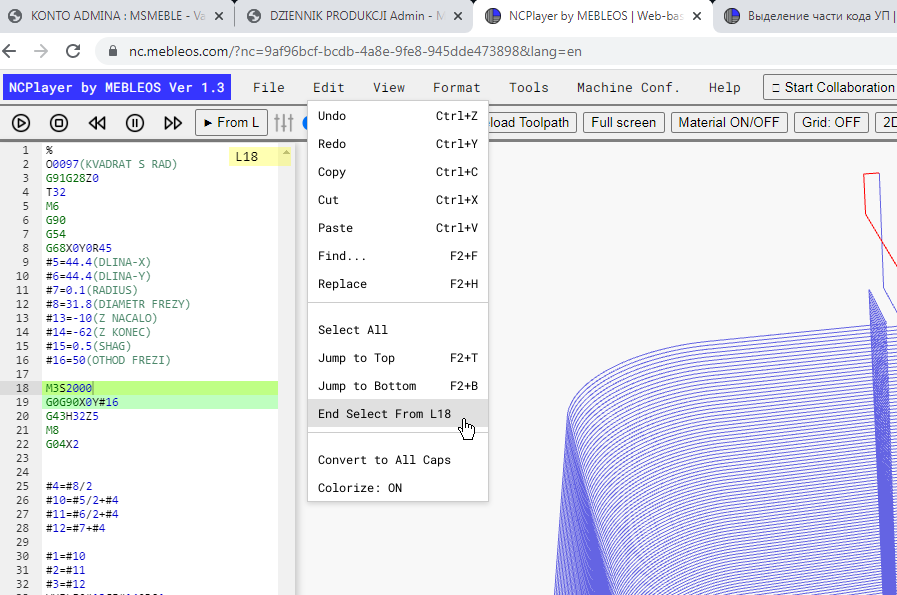
Selecting a Program Code Fragment (Begin/End Select)
The Begin/End Select function is designed for quickly selecting a specific range of lines in a CNC program with just two clicks.
How Selection Works
- Open the Edit menu and choose Begin/End Select, or use the assigned keyboard shortcut (if configured).
- The first click — beginning of selection (sets the start point).
- The second click — end of selection (sets the end point).
- All code between the start and end points will be automatically selected.
What You Can Do with the Selected Code Block
- Copy — paste the selected code into another location.
- Cut — move the block to another part of the code.
- Find / Search in selection — perform a search only within the selected area.
- Replace in selection — replace text within the selection.
- Print selection — print only the selected section of code.
- Edit — make any changes without affecting the rest of the code.
Advantages of Using Begin/End Select
- Quickly select large code fragments without manually dragging with the mouse.
- Convenient for working with subprograms, cycles, and specific trajectory segments.
- Reduces the risk of accidentally modifying unrelated lines.
Note: To clear the selection after you finish working with it, click anywhere in the code editor.
NCPlayer by MEBLEOS © 2026