Clean Program from Unnecessary Characters
The Remove Garbage function in NCPlayer is designed to automatically clean the CNC program (NC file) from unnecessary characters while preserving all important information, including comments. This helps make the G-code more readable and correct for simulation.
How the function works
- Preserving comments — all text inside parentheses
( ... )is temporarily replaced with placeholders to ensure it will not be altered. - Removing unnecessary characters outside comments:
- Removes invisible characters (tabs, non-breaking spaces, etc.).
- Removes unwanted characters:
!"№?@$^{}~\'<>|,(while keeping/and_as they can be part of division or placeholders). - Replaces multiple spaces with a single space.
- Removes spaces before semicolons
;. - If multiple
;are found at the end of a line, only one is kept.
- Restoring comments — all previously saved comments are returned to their original places unchanged.
- Removing empty lines — empty lines created after cleanup are deleted.
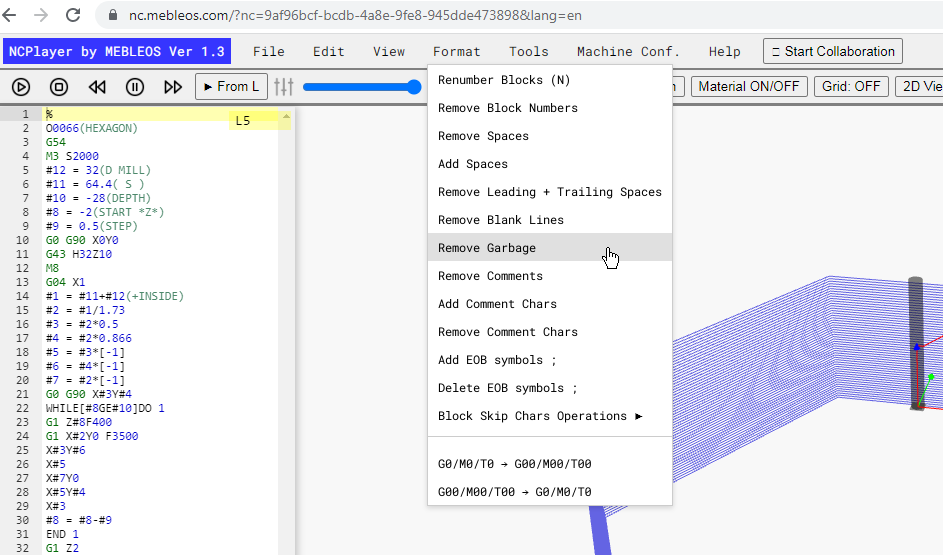
Purpose
This function is useful when importing code from CAM systems or other sources that may contain extra characters, formatting errors, or unnecessary spaces. Cleaning minimizes the risk of simulation errors and makes the code tidier.
Note: The function does not change the logical structure of the program or remove control commands;
it only removes unnecessary characters that hinder reading and analyzing the G-code.
NCPlayer by MEBLEOS © 2026