Reloading Toolpath in Simulator
The Reload Toolpath button performs a “soft reload” of the simulation without refreshing the page. The tool saves the current CNC program, runs the parser/preprocessor, and completely rebuilds the toolpath to reflect all changes made in the code.
How to Use
- Make changes to the G-code in the editor.
- Click Reload Toolpath in the top toolbar (or in the “View” menu if available).
- Wait until the update is complete — the “Last Saved” status and toolpath will refresh automatically.
- Start the simulation (▶) — the program is ready to run.
What Happens Under the Hood
-
Saving: the editor content is stored in
localStoragealong with a timestamp of the last save. -
Parsing and Preprocessing: lines are re-parsed, modal groups (G/M/S/T/F) are updated,
expressions and macro variables are evaluated, and commands like
M97/M98/M99,IF/WHILE/DO/END, and drilling cycles are expanded. - Toolpath Construction: motion segments (G0/G1/G2/G3) are generated, arcs and linear moves are recalculated, and the line-to-segment mapping (lineMap / segmentMap) is updated.
- Bounds and Stock: model dimensions are recalculated; stock size and position, visible axes, and view center are adjusted if necessary.
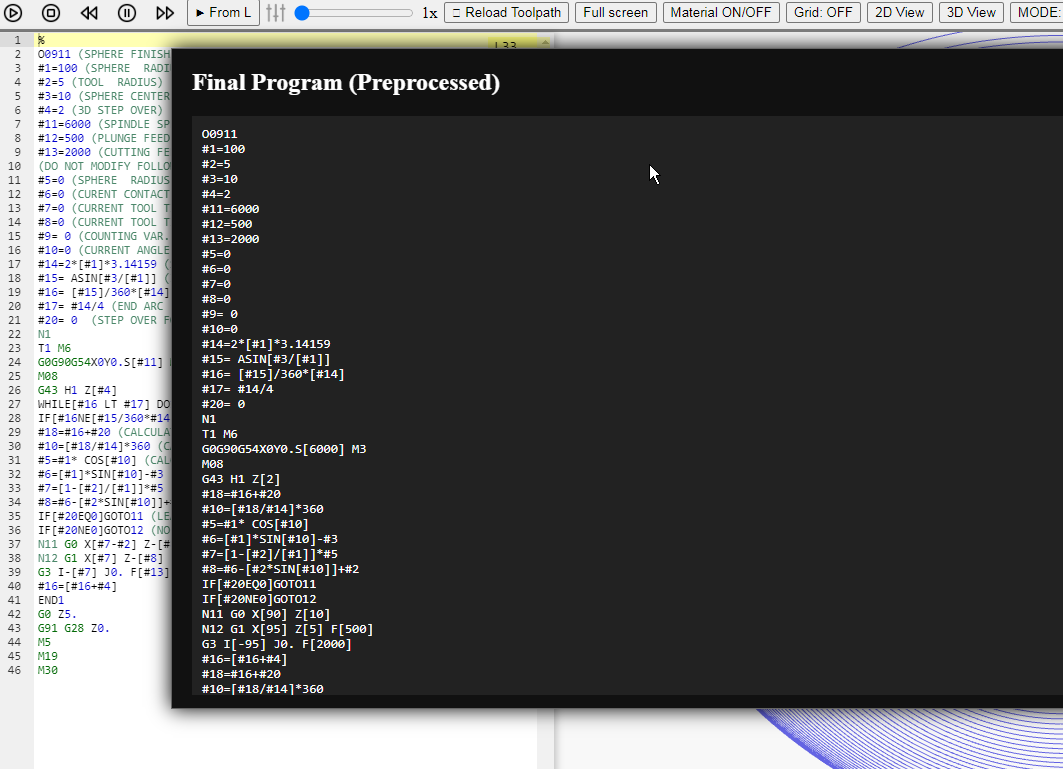
- Preprocessing Update: the Final Program (Preprocessed) window receives the latest expanded version of the code (after macro substitutions and subprogram expansion).
- Simulation State Reset: cursor, track, statistics, and temporary flags are cleared; the scene is ready for a new run.
When It’s Especially Useful
- After modifying addresses, feeds, arcs (IJK/R), and planes (
G17/G18/G19). - After changing macro logic (
#100…#199,#500…#531), conditions, and loops. - After format conversion (normalizing
G/M/Tcodes, adding EOB;, removing junk, etc.).
Tips
- Faster than reloading the page — selected modes (2D/3D, grid, toolpath trail, speed) are preserved.
- If Trail is enabled, its state will be preserved; clear the trail before starting a new run if necessary.
- For large CNC programs, reloading may take time — wait until the “Last Saved” status updates and the busy indicator disappears. If the simulation does not start for a long time, there may be errors or infinite loops in the code, the program may exceed 1 million lines, and/or extensive logging may be enabled in the console.
NCPlayer by MEBLEOS © 2026