Saving the CNC Program
In NCPlayer, you can save the current CNC program for later editing, simulation, and sharing. The service supports instant saving from the editor and automatic session restoration.
How to Save a Program
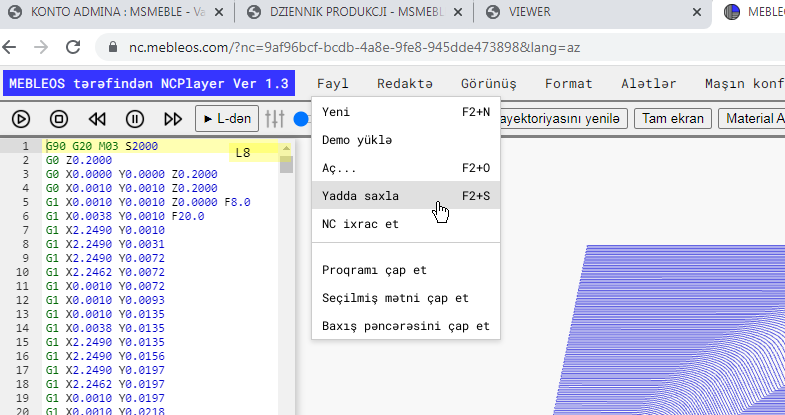
- In the top menu, select File → Save or press the shortcut key F2 + S.
-
The program will be saved to the browser's internal storage (
localStorage) and marked with a timestamp (Last Saved). -
To export the file to disk, use File → Export (if available) —
a
.nc/.txtfile will be created with the current editor content.
Where the Save is Stored
• Locally in the browser: the current editor content and service parameters (UUID, speed, modes, view) are stored
in localStorage and restored the next time NCPlayer is launched.
• Project UUID: each CNC program is assigned a unique identifier that NCPlayer uses to restore your last session.
• Privacy: data is not sent to the server — everything is stored locally on your device.
Autosave and Restore
• Autosave: in certain cases (trajectory reload, mode switching) NCPlayer automatically saves
the editor state and service flags.
• Restore: when the NCPlayer tab is opened again, it will load the last saved CNC program and simulation parameters.
• Timestamp: the header or status bar displays “Last Saved: date/time”.
Formats and Recommendations
• File to disk: use export to save in .nc or .txt format with the required encoding (UTF-8).
• Code cleanliness: before saving, you can apply formatting tools (remove clutter, add/remove EOB ;,
normalize G/M/T) to ensure a consistent program style.
• Backup copy: periodically save a copy of the file to disk to avoid data loss when clearing the browser.
Warnings
• Browser cleanup: deleting site data or using “Incognito” mode may erase local saves.
• Unsaved changes: when creating a new file or loading another CNC program, current changes may be lost —
make sure to Save (F2 + S) or Export first.
Hotkeys
• F2 + S — save the program to local storage.
• F2 + O — open a file from your computer.
• F2 + N — create a new CNC program (clears the editor).
• Standard: Ctrl + S (if configured in your browser/app), Ctrl + C/X/V — copy/cut/paste.